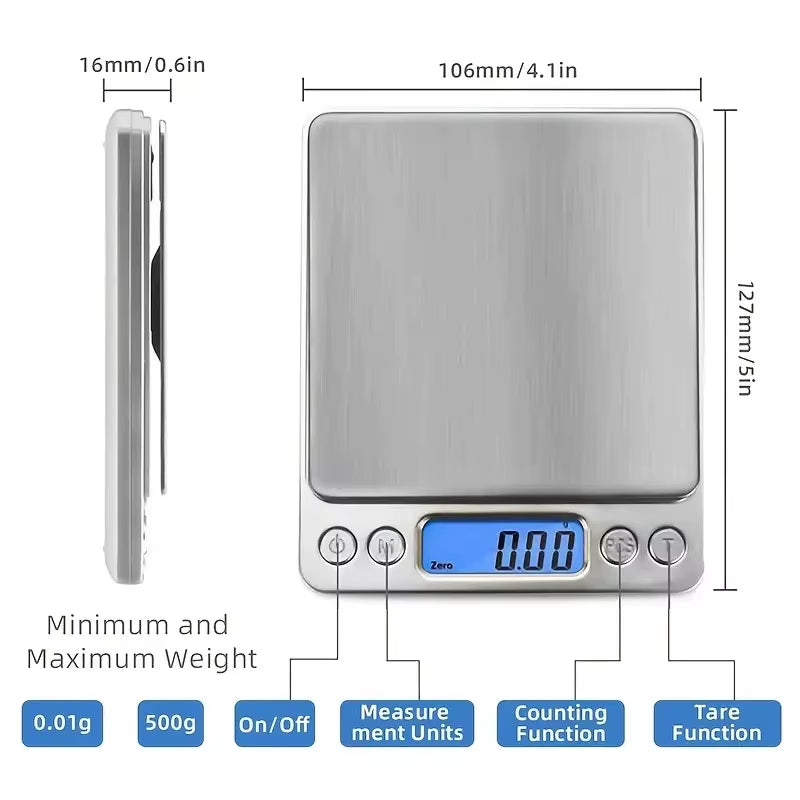
Accuweight Digital Kitchen Scale Stainless Steel Food Scale with LCD Display for Precise Weighing of Cooking Ingredients Diet
Accuweight Digital Kitchen Scale Stainless Steel Food Scale with LCD Display for Precise Weighing of Cooking Ingredients Diet
Calibration:
1:Reset the scales by pressing the [ON/OFF] key
2: Wait until the LCD "0.0" and then press and HOLD [UNITS] or [MODE] key for 3 seconds,the LCD will display "CAL",and then release the [UNITS] or [MODE] key
3:Press [UNITS] or [MODE] key again,the LCD will display "CAL" followed by the required calibration weight
4:Add the required calibration weight,the display will show "PASS" and return to normal weighing mode.(some item need Press [Units] or [MODE] key before step 4)
5:Put away the calibration weigh and press [ON/OFF] to turn off the scales and the calibration is finished.
Operation instruction:
Please put the scale on flat table
1:Press [ON/OFF] to switch on
2:You can press"M" to unit conversion when 0.0 or 0.00 show on the LCD
3:Put the goods on the scales after using conversion
Package includes:
1XDigital scale(without battery)

Product features
Product features
Materials and care
Materials and care
Merchandising tips
Merchandising tips